
Affiliate buying guide · Personalized Gifts
Personalized Pet Photo Blanket: Materials, Sizes, and Photo Tips
Pickorvia buying guide · Affiliate product links
Compare pet photo keepsakes
See the actual product options discussed below. Tap a product image or orange button to visit its CanvasChamp listing. Verify size, customization, final price and delivery before ordering.
Product images are illustrative of merchant listings, not proof of a tested purchase. Prices and configurations may change. Choose and confirm your exact options on CanvasChamp.
A personalized pet photo blanket works best when the portrait is clear, the material matches the intended use, and the pet remains recognizable at the chosen size. Begin with the photograph, then choose the blanket. More fabric or more pictures cannot compensate for an image in which the eyes and expression are already hard to see.
This is a research-based selection guide for pet-owner gifts, not a ranking of tested softness or durability. We checked CanvasChamp’s US product information on November 15, 2026. The illustrations are design concepts. See our research approach for how we distinguish listed specifications from hands-on evidence.
Start with the pet photo and intended use
Decide whether the blanket is for the owner to use on a couch, a gift for another pet lover, or a decorative display. That choice affects size, layout, and care priorities. A design intended to hang flat can use a different composition from one normally folded over an armchair. Ask whether the recipient actually wants a visible pet portrait in that space.
For an owner gift, choose the expression they recognize: a familiar head tilt, resting pose, or alert gaze. An elaborate background matters less than the pet’s identity. For a surprise, ask someone who knows the pet which photo feels representative; a technically sharp picture can still capture an uncharacteristic expression.
A photo blanket is not automatically suitable as everyday pet bedding. Do not infer chew resistance, resistance to claws, or suitability for unsupervised use from a personalization image. If the intended purpose is a washable bed cover, establish construction and care requirements separately before choosing a decorative keepsake.
Compare fabrics and choose a practical size
CanvasChamp’s pet-blanket page identifies fleece and Sherpa options. Its broader blanket catalog also lists woven products. Treat these as different configurations and verify the selected product rather than assuming every pictured fabric is available in the pet-specific editor. The table describes decisions to make, not measured performance.
| Material route | Useful preference | Check before choosing | Limitation |
|---|---|---|---|
| Printed fleece | A printed portrait on a textile surface | Fiber, printed side, and care label | Screen detail may look different on fabric |
| Fleece Sherpa | A printed face with a contrasting backing texture | Backing and available personalization sides | Additional texture does not establish superior quality |
| Woven | A visibly textile interpretation of the portrait | Reproduction method and image preview | Small facial details may translate differently |

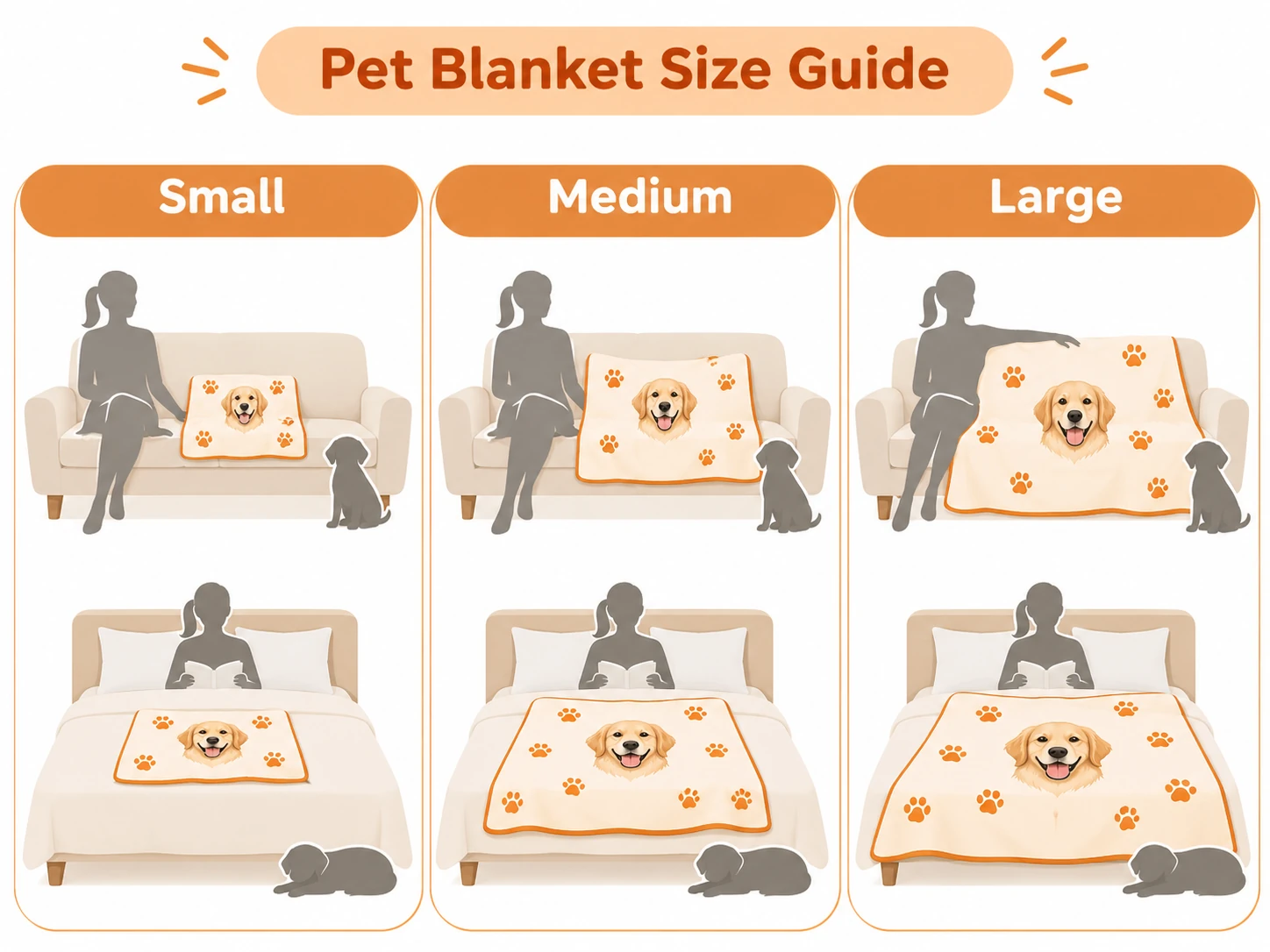
Measure an existing blanket used in the same place. The general catalog lists sizes including 40 by 30, 50 by 60, and 60 by 80 inches, but the active material selection must confirm availability. Lay out those dimensions with a tape measure rather than deciding from “small,” “medium,” or “large.” Consider both coverage and storage.
Printed fleece and Sherpa options
A fleece pet photo blanket and a Sherpa-backed option should be compared by the actual surfaces, not just the fabric name. Confirm which side holds the portrait, whether the back is plain, and whether a second printed side is supported. Do not assume the backing shown in an illustration represents your final order.
If the blanket will be folded, place the main portrait in the area likely to remain visible. A name at the very bottom may disappear beneath a fold. The primary advantage of a simple printed layout is that the pet can remain the clear focal point; the limitation is that a digitally crisp preview cannot demonstrate the fabric’s real appearance.
Woven options need a separate image check
A woven pet blanket should be treated as a translation of the image into a textile structure, not a substitute photograph with guaranteed identical detail. Inspect how eyes, whiskers, and light fur against light backgrounds will be represented. Ask the seller what preview or image assessment applies to the selected woven configuration.
Choose fewer, larger features if the source is complicated. A clean silhouette and clearly separated face give you a better design to evaluate than a tiny pet surrounded by furniture. If accurate small detail is essential, compare a printed format or a smaller display instead of assuming weaving will preserve everything.
Prepare a dog or cat portrait that will reproduce clearly
Find the original camera file before editing. Check it at a larger view for motion blur around the eyes, compression blocks, and distracting objects crossing the face. A dog photo blanket made from a lively action shot can be charming, but the movement may have blurred the very features that make the picture personal.
For a cat photo blanket, look beyond an attractive pose and inspect whiskers, ears, and dark areas around the eyes. Leave room around the silhouette so a layout adjustment does not amputate an ear or tail. Work from a copy of the original, and save the uncropped version so you can reconsider the composition later.

Check dark fur, eyes and background contrast
Black or dark-brown fur needs enough tonal separation to distinguish the face from the background. Try a photograph with soft natural light and visible eyes rather than pushing a very dark image to extremes. Brightening can make a picture easier to assess, but it can also reveal noise or flatten the fur’s texture.
Check white fur too: a bright window or pale wall can erase the outline when highlights are overexposed. The useful question is not whether the photo looks dramatic on a phone, but whether the face stays readable at the planned portrait size. Keep natural colors unless a deliberately stylized portrait is what the recipient wants.
Choose single-photo, repeated portrait or collage layouts
A single portrait gives the largest continuous area to one expression. A repeated portrait creates a pattern but can make each face smaller. A collage can include several pets or moments, provided the photos have reasonably consistent brightness and every important subject remains large enough to recognize.
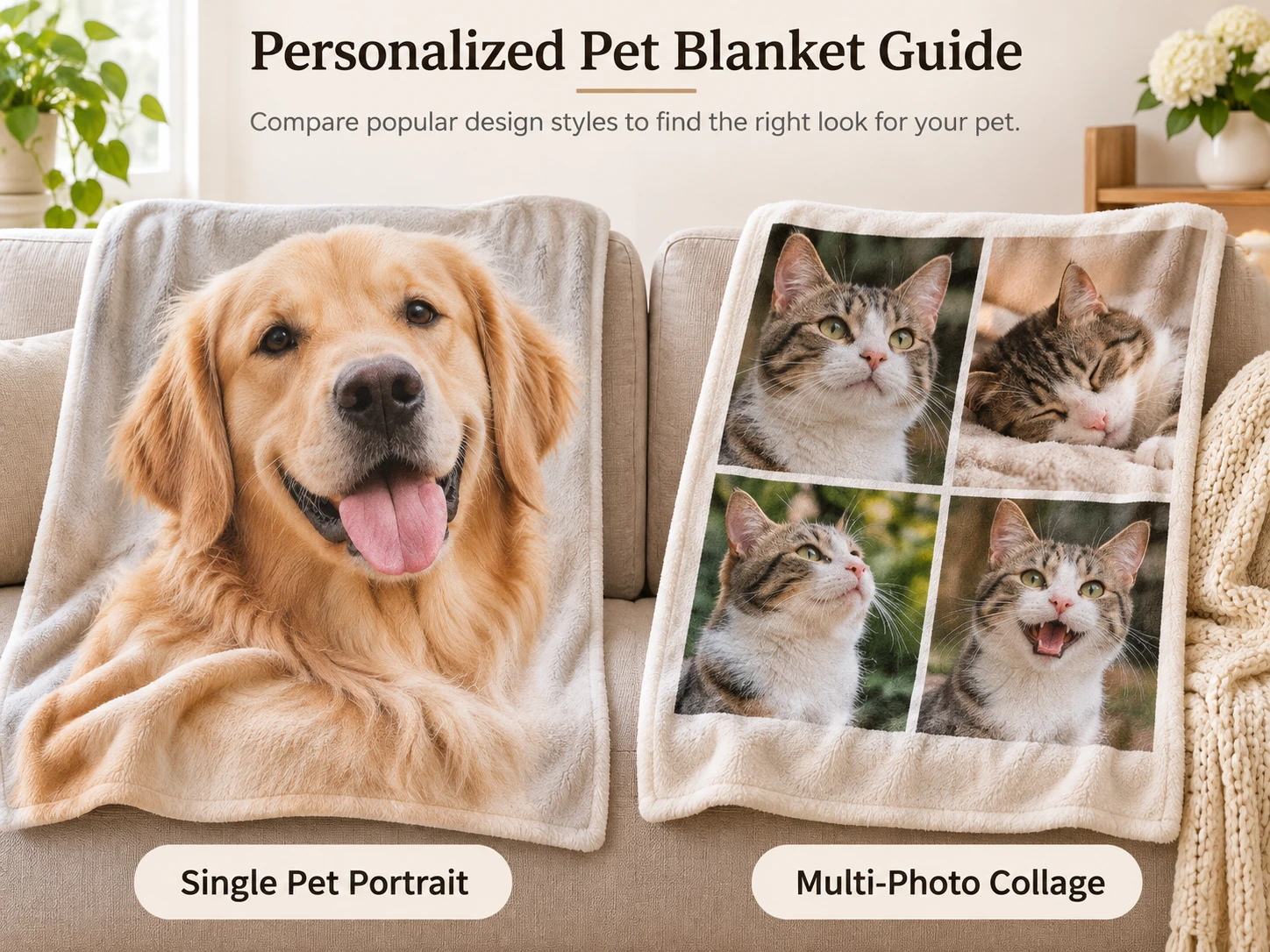
For a pet blanket with name, use short text with enough contrast against its background. Check the spelling, capitalization, and any punctuation. Preview the name together with the photograph; a decorative font that looks attractive by itself may compete with whiskers, fur, or a busy background. Extra decoration should earn its space.
When combining multiple pet photos, compare head sizes rather than making every photograph the same outer dimensions. One close-up and one distant full-body image can produce an unintentionally unequal design. A consistent portrait scale often works better than forcing unrelated photos into matching boxes.
Preview, order, and care for the blanket
Review the design in two passes. First check identity and composition: the correct pet, readable eyes, complete ears, and the intended expression. Then check order details: material, dimensions, printed sides, text, quantity, shipping address, and total USD. Save the approved design and order summary together.
For a broader look at the merchant before checkout, compare CanvasChamp ordering and policy checks.
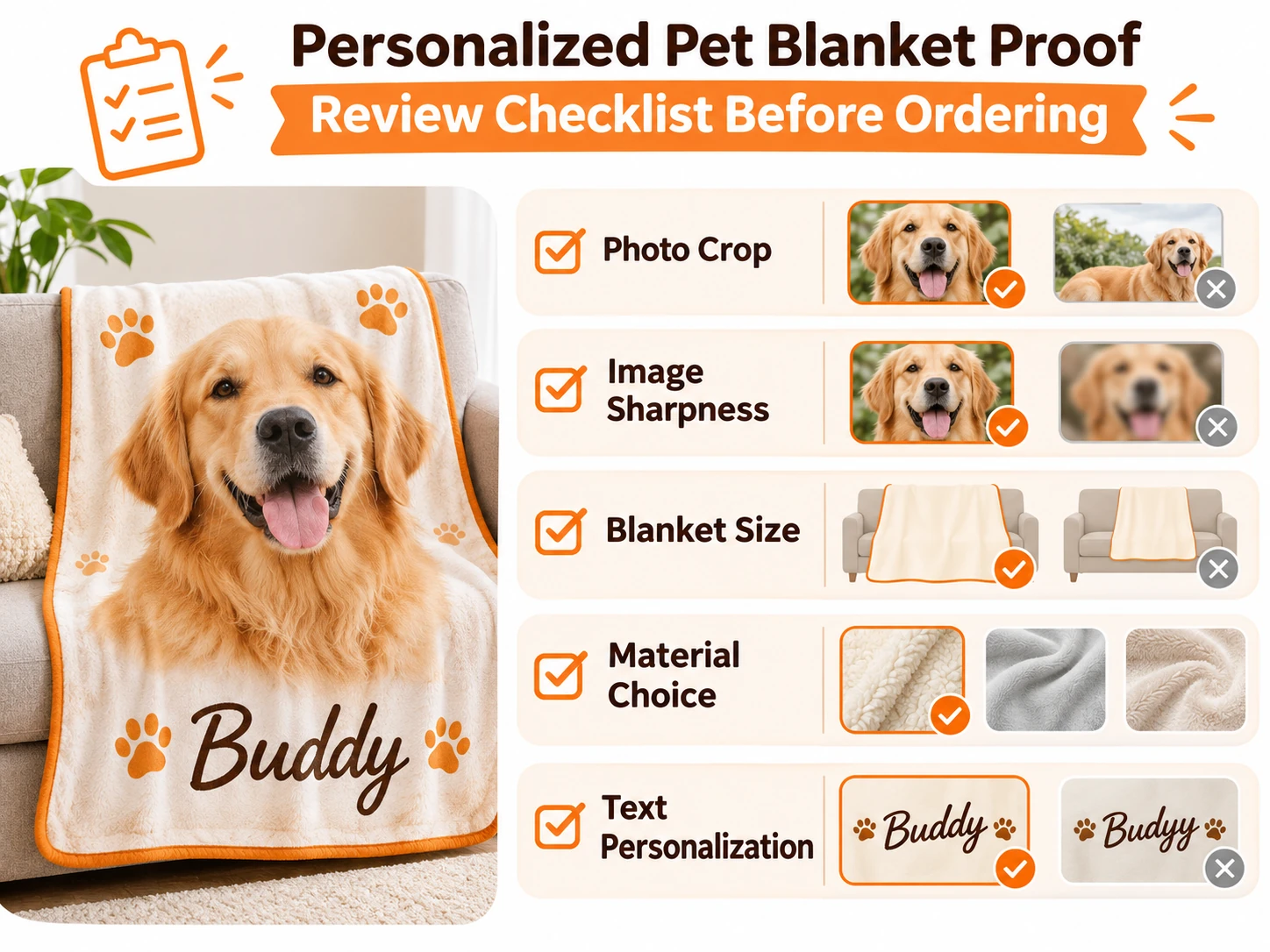
Use the product-specific care instructions supplied with the blanket. CanvasChamp’s fleece guidance describes cold gentle washing and low-heat drying, but a woven or differently backed configuration may need its own instructions. Do not apply a promotional claim about lasting color as proof of wash performance; no laundering test was performed for this guide.
If anything about the preview is unclear, resolve it before paying. Confirm the delivery estimate for the actual order and ask how an error would be handled. The merchant FAQ should be read alongside the terms; public reporting-window language differs, so prompt contact is the sensible approach if a problem appears.
When the blanket arrives, inspect it before washing. Compare the name, layout, material selection, and size with the order. Photograph a discrepancy and keep the packaging until support gives instructions. A difference from the approved design and a spelling mistake already present in the proof are different issues; explain which occurred.
Other formats for the same pet photo
A pet photo gift can take a different form when a blanket would be too large or inconvenient. A physical puzzle suits someone who enjoys assembling images; a smaller framed print suits someone with display space; a shaped pillow emphasizes the animal’s outline. Choose the format for its actual use, not simply because the file can be uploaded.
If a blanket is not the right format, you might turn a pet photo into a puzzle; our photo-gift ideas for him also cover keepsakes for a pet-loving recipient.
For a partner, dad, or friend, check whether the portrait would fit their room and preferences. Some pet owners like discreet objects and others enjoy large decorative portraits. If none of these formats fits, a good-quality ordinary blanket or a printed photograph in an existing frame can still be a thoughtful choice.
Frequently asked questions
Can I put more than one pet on a blanket?
Yes, multiple portraits can work when the selected editor supports the layout. Check each source file independently and make sure all faces remain recognizable. Do not let the smallest or darkest portrait become an afterthought. A simple layout with fewer images can be stronger than filling every available panel.
Will a screenshot of my pet work?
Possibly, but check its pixel dimensions and quality before relying on it. A screenshot may include interface elements, compression, or far less detail than the original. Request the original if available. If it is the only copy, consider a smaller portrait area and ask the printer to assess the actual file rather than assuming it is unusable.
Is a photo blanket suitable as a pet's everyday bed?
Not automatically. A decorative photo product does not establish the construction, washing tolerance, or resistance to chewing needed for that use. Confirm the exact intended-use information and consider purpose-made bedding when that is the priority. A portrait blanket can remain an owner keepsake without also becoming the animal’s daily bed.
Final choice: match the design to the photo
Choose a personalized pet photo blanket only after the portrait, practical size, and material are settled. The most useful final checks are simple: recognizable eyes, complete crop, correct name, suitable dimensions, and care instructions the recipient can follow. A complicated collage is optional; a clear portrait is the foundation.
Use the relevant blanket card to examine current customization options when those checks are complete. If the file cannot support the desired portrait or the textile format does not suit the recipient, reduce the image area or choose another keepsake. The right decision protects the character of the pet photo rather than maximizing the size of the order.